
Certificate Validator
Know a certificate is actually trustworthy before it's a 2am incident. Check expiry, trust chain, revocation, key strength, and hostname match - from a live endpoint, the Windows Certificate Store, or a file.
Know a certificate is actually trustworthy before it's a 2am incident. Check expiry, trust chain, revocation, key strength, and hostname match - from a live endpoint, the Windows Certificate Store, or a file.
Certificate Validator checks certificates from three sources - a live TLS endpoint (host:port), the local Windows Certificate Store, or a certificate file (.cer/.crt/.pfx) - against one shared set of checks: expiry, trust chain validity, revocation status, key strength, SAN/hostname matching, and compliance against a configurable policy. A real TLS handshake completes even against an expired, self-signed, or otherwise untrusted certificate, so it can actually be inspected rather than rejected outright - exactly the scenario this tool exists to catch.
The real app. Click to zoom in, hover the markers to see what each part does.
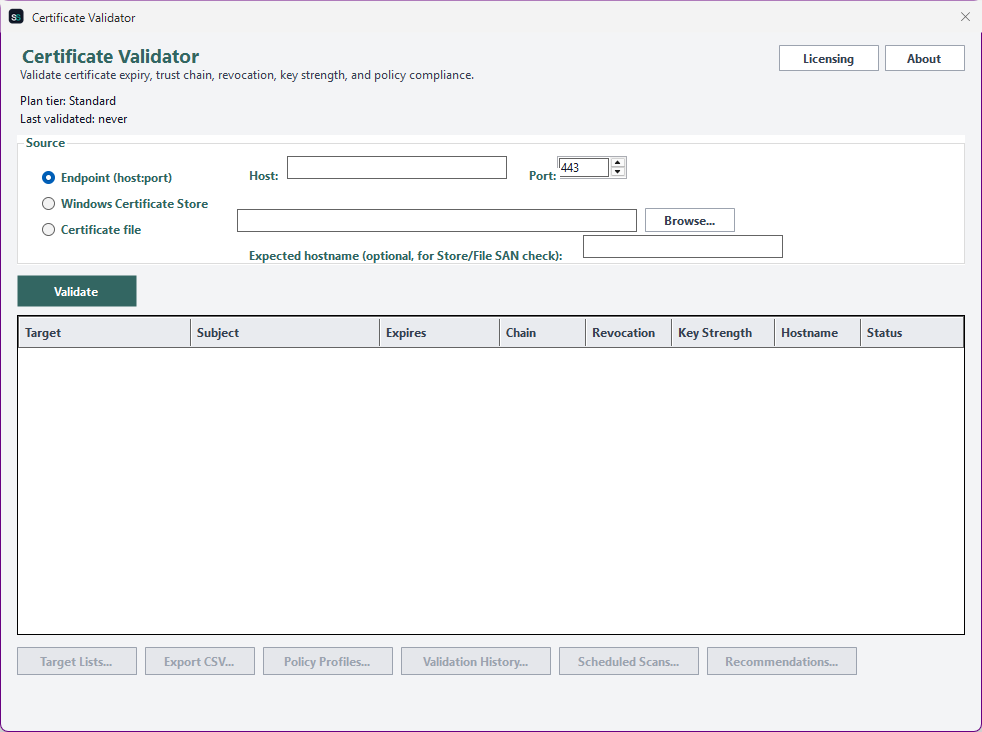
Hover a marker for details, or click the screenshot to zoom in.
Validate a live endpoint, a certificate already installed in the Windows Certificate Store, or a standalone .cer/.crt/.pfx file - every source runs through the exact same analysis.
A real chain build, an online revocation check, and inspection of key size and signature algorithm - RSA/EC minimums enforced, MD5/SHA1 signatures flagged.
Check every certificate against a policy profile - minimum key size, disallowed signature algorithms, maximum validity period, and an expiry warning threshold - not just the built-in default.
Save a list of targets and validate them all in one run, then export the results grid for reporting or further analysis.
Register a saved target list to re-validate daily via Windows Task Scheduler, or drive it from your own scripts with CertificateValidator.exe --validate ... - a distinct exit code tells "expiring soon" apart from "actually broken."
Rule-based, explainable prioritization of which certificates to renew first - soonest-expiring first, with revoked or broken-chain certificates called out separately since renewing alone won't fix those.
Pick how much automation you need, then choose once-off or monthly billing. Certificate Validator licenses per machine, not by certificate volume.
One-time payment - yours to keep, no subscription.
For checking one certificate at a time.
Single-target validation - one endpoint, store certificate, or file - full finding detail on screen.
For checking many certificates at once.
Everything in Standard, plus batch validation of a saved target list and CSV export.
For enforcing your own compliance bar.
Everything in Standard+, plus custom policy profiles and persisted validation history across runs.
For fully unattended certificate hygiene.
Everything in Advanced, plus scheduled scans, a headless CLI, and renewal recommendations.
Prices are shown in USD as the reference figure. Other currencies, including the ZAR amount PayFast actually charges, are converted using a live exchange rate.
Loading live exchange rates...
Standard covers the core of Certificate Validator: point it at one endpoint, one store certificate, or one file, and see the full finding - expiry, chain, revocation, key strength, SAN match, and policy compliance against the built-in default profile. No batch, export, or automation at this tier, by design.
Best for: Anyone who wants a quick, thorough check of a single certificate.
Standard+ adds batch validation - save a list of targets (endpoints, store certificates, files) and validate them all in one run - plus CSV export of the results grid for reporting. Everything from Standard is included.
Best for: Anyone validating more than a handful of certificates at once.
Advanced adds custom policy profiles - author your own minimum key sizes, disallowed signature algorithms, maximum validity period, and expiry warning threshold beyond the built-in default - plus validation history, so you can spot regressions and newly-expiring certificates over time. Everything from Standard+ is included.
Best for: Teams enforcing their own internal compliance bar, not just industry defaults.
Professional adds scheduled scans (a saved target list re-validated daily via Windows Task Scheduler), a headless CLI (CertificateValidator.exe --validate ..., with a distinct exit code separating "expiring soon" from "actually broken" so scripts can tell them apart), and rule-based renewal recommendations. Everything from Advanced is included.
Best for: Organizations that need certificate hygiene genuinely enforced on a schedule, not just checked occasionally by hand.
Prices shown are a suggested starting point, not final quotes - contact us to confirm your plan.
Contact us for current pricing and licensing options.
Contact us