Network Change Auditor
See who changed your network configuration, and when - firewall rule changes, adapter connect/disconnect, and IP configuration changes, read straight from your Windows Firewall and System event logs.
See who changed your network configuration, and when - firewall rule changes, adapter connect/disconnect, and IP configuration changes, read straight from your Windows Firewall and System event logs.
Network Access Reporter answers "what does this machine's firewall look like right now" - a point-in-time snapshot. Network Change Auditor answers the question it can't: who added that rule, and when did this adapter drop off the network? It reads the Windows Firewall With Advanced Security event log for rule added/modified/deleted/ignored-due-to-conflict events, and the System/NetworkProfile event log for adapter connect/disconnect and network-profile-changed events. Every event - regardless of type - lands in one unified list with 19 built-in queries: time-windowed views (last 24 hours/7 days/30 days), rule-change filters, adapter-connectivity filters, and parameterized searches for a specified actor, target, or source host. Build your own queries with custom filter conditions, export to CSV, Excel, HTML, XML, or the clipboard, and schedule any of it to run - and email itself to you - unattended.
The real app. Click to zoom in, hover the markers to see what each part does.
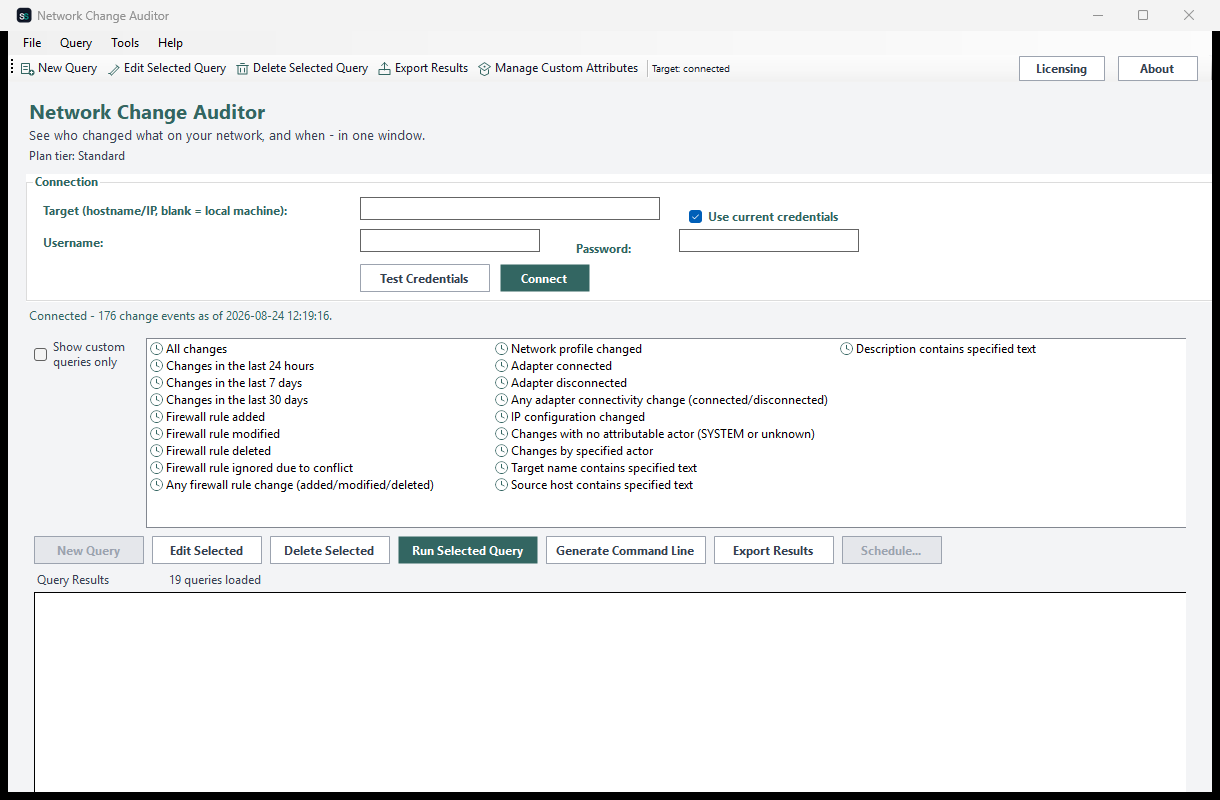
Hover a marker for details, or click the screenshot to zoom in.
Reads the Windows Firewall and System event logs directly, so every row shows what actually changed and exactly when - not just that something differs since the last scan.
Time-windowed views, firewall rule added/modified/deleted, adapter connected/disconnected, network-profile changes, and parameterized actor/target searches - no separate tab per event type.
See exactly when a network adapter connected or disconnected, and when the active network profile changed - useful for spotting rogue devices or unexpected reconnects.
Search for every change made by a specified actor, or isolate changes with no attributable actor (SYSTEM or unknown) - the ones worth a second look.
Build your own query from filter conditions on any attribute, and register extra attributes under a friendly display name via Manage Custom Attributes.
Save any query as a recurring report via Windows Task Scheduler, with the result optionally emailed to you afterward - or drive it yourself with NetworkChangeAuditor.exe --run-report ... and --run-query ....
Pick how much automation you need, then choose once-off or monthly billing. Network Change Auditor licenses per machine.
One-time payment - yours to keep, no subscription.
For core rule-change auditing.
Firewall rule added/modified/deleted/ignored events and time-windowed queries, on screen, free at every tier.
For the complete picture.
Everything in Standard, plus adapter/profile/IP-config change events and CSV/Text export.
For deeper investigation.
Everything in Standard+, plus custom queries, richer export formats, and actor search.
For fully unattended audits.
Everything in Advanced, plus scheduled & emailed reports and a headless CLI.
Prices are shown in USD as the reference figure. Other currencies, including the ZAR amount PayFast actually charges, are converted using a live exchange rate.
Loading live exchange rates...
Standard covers the core of any change audit: firewall rule lifecycle events, the full time-windowed query catalog, and column selection - all on screen. No adapter/profile events or export at this tier, by design.
Best for: Anyone who needs a fast answer to "when was this rule added, and by whom?"
Standard+ adds adapter connected/disconnected and network-profile-changed events, plus CSV/Text report export. Everything from Standard is included.
Best for: Day-to-day monitoring of network connectivity changes.
Advanced adds custom queries with Manage Custom Attributes, Excel/HTML/XML/clipboard export, and the "changes by specified actor" search. Everything from Standard+ is included.
Best for: Security teams building their own change-review reports.
Professional adds scheduled reports via Windows Task Scheduler with optional email delivery, and a headless CLI (NetworkChangeAuditor.exe --run-report, --run-query, --run-custom-query). Everything from Advanced is included.
Best for: Organizations that want recurring change audits running themselves.
Prices shown are a suggested starting point, not final quotes - contact us to confirm your plan.
Contact us for current pricing and licensing options.
Contact us