Secure@Rest
Lock down every file without locking yourself out. Per-file AES-256 encryption for Windows that manages its own keys, so protection never becomes a daily password to remember.
Lock down every file without locking yourself out. Per-file AES-256 encryption for Windows that manages its own keys, so protection never becomes a daily password to remember.
Every file gets its own randomly-generated AES-256 key, so a compromise of one file's key exposes nothing about any other file. Keys are protected by Windows DPAPI by default - no password to remember or re-enter - with an optional recovery key as a backup path if the Windows profile that encrypted a file is ever lost or the machine is reimaged.
The real app. Click to zoom in, hover the markers to see what each part does.
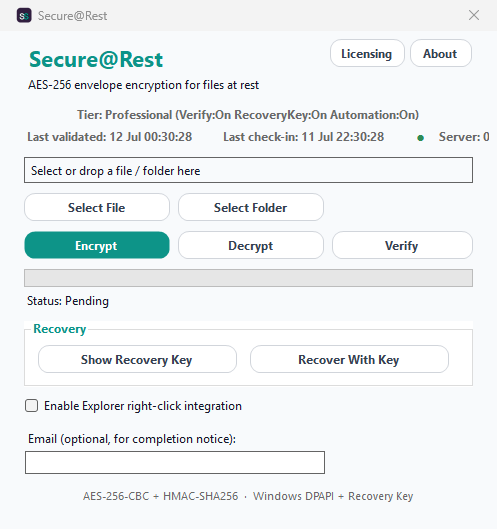
Hover a marker for details, or click the screenshot to zoom in.
Every file gets its own unique AES-256 + HMAC-SHA256 key pair - encrypt-then-MAC, verified before a single byte is decrypted.
Keys are protected by Windows DPAPI day-to-day, with a separate long-lived recovery key as a backup if this Windows profile is ever lost.
Encrypt or decrypt whole directory trees in one operation - already-encrypted files are skipped automatically.
Confirm a file's integrity - untouched since it was encrypted - without ever producing a decrypted copy on disk.
Right-click any file or folder to encrypt or decrypt it directly, or script it via the command line - no admin rights needed.
Every encrypt, decrypt, and delete operation is recorded to a rotating daily log.
Pick the protection level you need, then choose once-off or monthly billing. Secure@Rest licenses per machine, not by data volume.
One-time payment - yours to keep, no subscription.
For individuals and small teams who just need straightforward encrypt/decrypt.
Per-file AES-256 envelope encryption, DPAPI-protected keys.
For anyone who needs assurance that encrypted archives are still intact.
Everything in Standard, plus Verify.
For anyone who can't afford to lose access if a PC dies or is reimaged.
Everything in Standard+, plus a Recovery Key.
For power users and organisations automating encryption into their workflow.
Everything in Advanced, plus Explorer & CLI automation.
Prices are shown in USD as the reference figure. Other currencies, including the ZAR amount PayFast actually charges, are converted using a live exchange rate.
Loading live exchange rates...
Standard covers the core of Secure@Rest: per-file AES-256 envelope encryption and decryption, single files or whole folder trees, with keys protected by Windows DPAPI - no password to manage day to day. There's no file-integrity verification or recovery-key backup built in at this tier.
Best for: Individuals and small teams who just need straightforward encrypt/decrypt on a single machine, with nothing else to configure.
Standard+ adds Verify - confirm a file hasn't been tampered with or corrupted since it was encrypted, without ever producing a decrypted copy on disk. Everything from Standard is included.
Best for: Anyone who needs periodic assurance that encrypted archives are still intact - long-term storage, backups, or files that don't get touched often.
Advanced adds the Recovery Key - a separate, exportable key that can unlock your files even if the Windows profile that originally encrypted them is ever lost, reset, or moved to a new machine. Everything from Standard+ (Verify) is included.
Best for: Anyone who can't afford to lose access if a PC dies, gets reimaged, or a user profile is deleted - a real recovery path instead of relying solely on DPAPI tied to one Windows profile.
Professional adds Automation - right-click Explorer integration to encrypt or decrypt directly from any file or folder, plus a CLI/scripting interface for unattended and scheduled use. Everything from Advanced (Verify, Recovery Key) is included.
Best for: Power users and organisations who want encryption built into their everyday workflow or scripted into existing automation, not run manually from the app window each time.
Prices shown are a suggested starting point, not final quotes - contact us to confirm your plan.