
SignalHawk
Real network attack paths, not just findings - map the way in before someone else does. The flagship of the Network Management Solutions line.
Real network attack paths, not just findings - map the way in before someone else does. The flagship of the Network Management Solutions line.
Network Security Posture tells you what's individually wrong. SignalHawk goes further: it builds a real in-memory graph from live host reachability - which hosts have management ports (RDP, SSH, SMB-admin, WinRM) open to which other hosts, which share a subnet, which route through the gateway - and searches that graph for arbitrary-depth (up to 6-hop, not a fixed check) paths from any discovered host to your critical assets. Every finding, whether a simple indicator or a full attack path, lands in one unified list with 20 built-in queries, including "Attack paths to a critical asset (full graph search)" and "Shortest attack path from specified source host." Build your own queries with custom filter conditions, export to CSV, Excel, HTML, XML, or the clipboard, and schedule any of it to run - and alert you the moment a new path appears.
The real app. Click to zoom in, hover the markers to see what each part does.
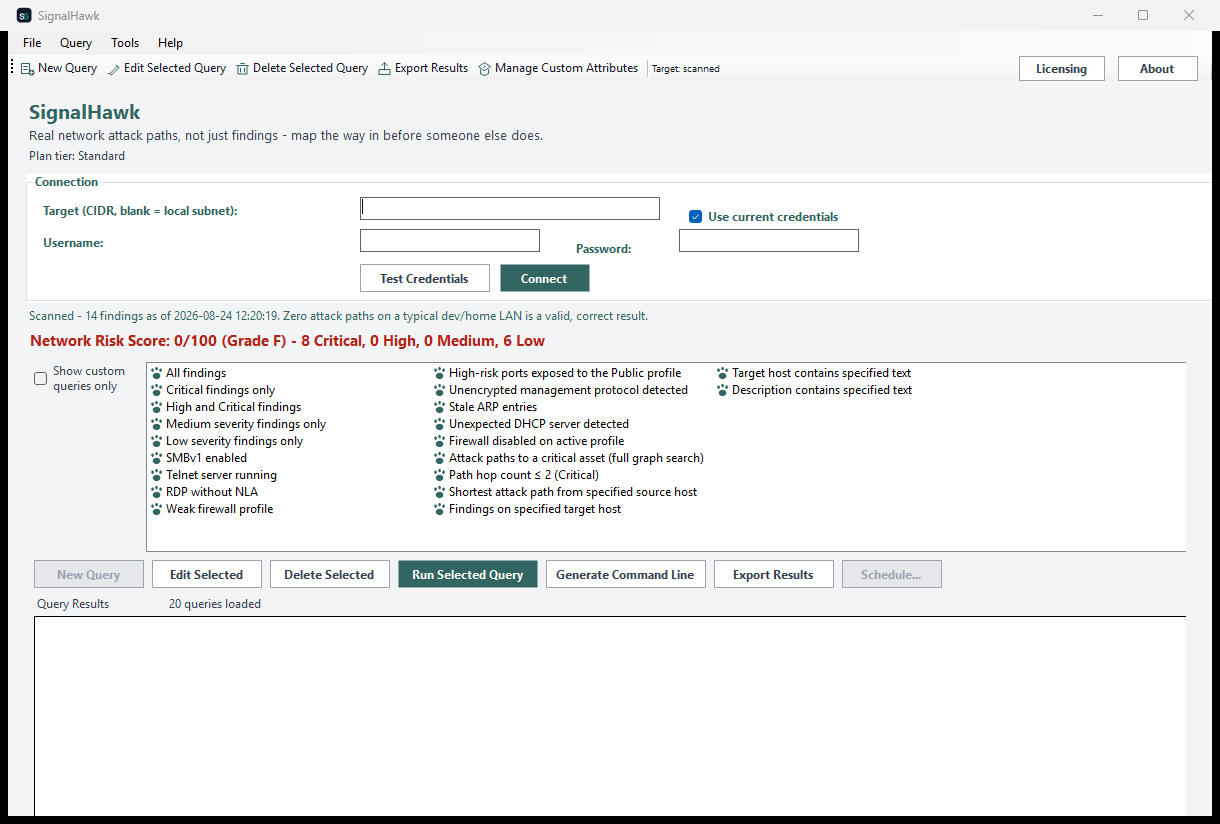
Hover a marker for details, or click the screenshot to zoom in.
Builds an in-memory reachability graph from a live discovery sweep and searches it up to 6 hops deep for routes to your critical assets - not a fixed 2-hop check.
The default gateway and any host with both SMB and a remote-management port (RDP/WinRM) open are treated as critical assets automatically - or point SignalHawk at a specific target yourself.
All nine of Network Security Posture's own checks, at the same tiers, plus the full attack-path graph search as SignalHawk's own Professional-tier differentiator.
A single number and letter grade that rolls up every finding - including discovered attack paths - by severity.
Build your own query from filter conditions on any attribute, including Path Summary and Hop Count for attack-path rows.
Save any query as a recurring report via Windows Task Scheduler, with the result optionally emailed to you afterward - or drive it yourself with SignalHawk.exe --run-report ... and --run-query ....
Pick how much automation you need, then choose once-off or monthly billing. SignalHawk licenses per machine.
One-time payment - yours to keep, no subscription.
For the cheap, always-on checks.
The core findings shared with Network Security Posture, on screen, free at every tier.
For firewall & network posture.
Everything in Standard, plus firewall-profile/ARP/DHCP findings and CSV/Text export.
For custom investigation.
Everything in Standard+, plus custom queries, richer export formats, and bounded reachability checks.
The real differentiator.
Everything in Advanced, plus the full arbitrary-depth (6-hop) attack-path graph search, scheduled & emailed reports, and a headless CLI.
Prices are shown in USD as the reference figure. Other currencies, including the ZAR amount PayFast actually charges, are converted using a live exchange rate.
Loading live exchange rates...
Standard covers the cheapest, always-on checks: SMBv1 enabled, Telnet server running, and RDP without NLA - all on screen. No graph search, firewall-profile findings, or export at this tier, by design.
Best for: A first look at whether SignalHawk is worth deploying wider.
Standard+ adds weak/disabled firewall-profile, ARP, and DHCP findings, plus CSV/Text report export. Everything from Standard is included.
Best for: Day-to-day posture monitoring across a fleet of machines.
Advanced adds custom queries with Manage Custom Attributes, Excel/HTML/XML/clipboard export, and the bounded reachability checks. Everything from Standard+ is included - this alone already matches Network Security Posture's entire feature set.
Best for: Security teams who want everything Network Security Posture offers, from SignalHawk.
Professional is the real differentiator: the full, arbitrary-depth attack-path graph search to your critical assets, plus scheduled reports via Windows Task Scheduler with optional email delivery, and a headless CLI (SignalHawk.exe --run-report, --run-query, --run-custom-query) for unattended runs that alert the moment a new attack path appears.
Best for: Organizations that want to know their actual exposure, not just a list of misconfigurations.
Prices shown are a suggested starting point, not final quotes - contact us to confirm your plan.