DLM/DRM
Data Retention and Lifecycle Manager. Stop letting stale files pile up forever - evaluate them against a policy, then archive or retire them, with a full audit trail of every action.
Data Retention and Lifecycle Manager. Stop letting stale files pile up forever - evaluate them against a policy, then archive or retire them, with a full audit trail of every action.
DLM/DRM evaluates files on any scanned file server or NAS path against retention policies you define - primarily file age, based on last-access and last-write timestamps - and acts on the matches: archiving them to a location you choose, or, for files that genuinely need to go, permanently deleting them. Every dry-run scan is read-only at every plan tier; nothing is ever archived or deleted without an explicit review-and-approve step, and every action - successful or failed - is written to a permanent audit trail.
The real app. Click to zoom in, hover the markers to see what each part does.
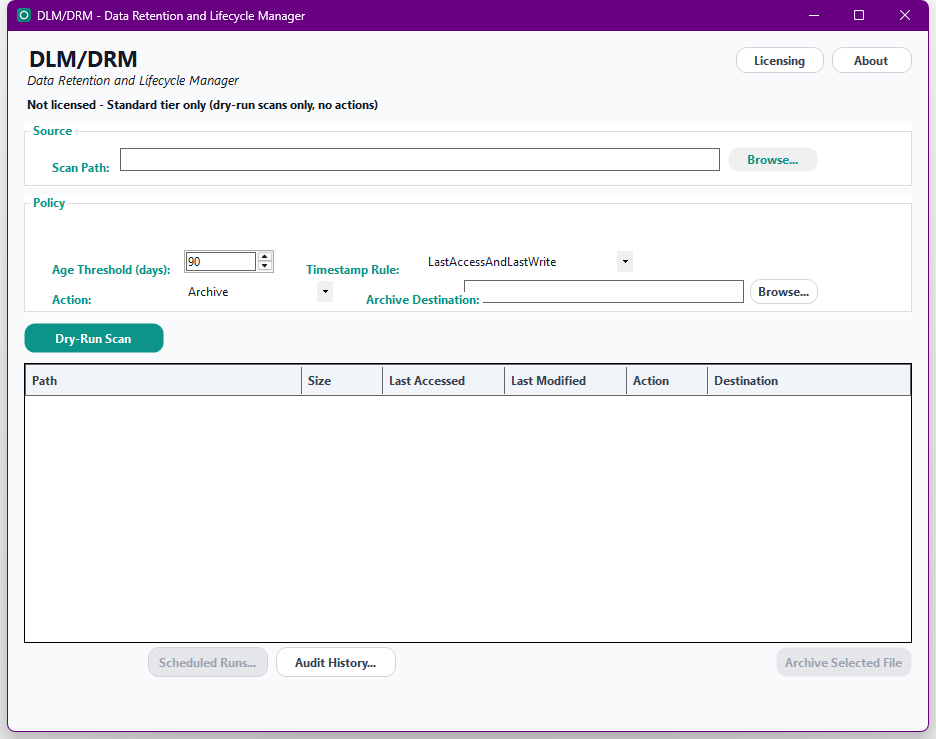
Hover a marker for details, or click the screenshot to zoom in.
Every policy is evaluated as a dry run first, at every plan tier - a full preview of exactly which files would be archived or deleted, with nothing on disk touched until you explicitly approve it.
Moves matched files to a configurable local or UNC destination, preserving their original folder structure, with collision-safe handling so nothing already archived is ever silently overwritten.
For files that genuinely need to go. Gated to the Professional plan, and blocked behind a dedicated confirmation screen that requires typing the word DELETE before it can run.
Save a policy once - scan path, age threshold, which timestamp(s) count, and the action to take - then reuse it, and approve matches individually or in bulk via a review queue.
Register a policy to run daily via Windows Task Scheduler. A scheduled Permanent Delete additionally requires its risk to have already been accepted interactively for its exact current settings - it can't quietly start deleting files unattended the first time.
Every action - successful or failed - is written to a permanent, append-only log and a queryable in-app history viewer, with CSV export for compliance reporting.
Pick how much automation you need, then choose once-off or monthly billing. DLM/DRM licenses per machine, not by data volume.
One-time payment - yours to keep, no subscription.
For seeing what would happen, first.
Full dry-run scan/report against a policy - no action of any kind, always read-only.
For manually clearing out what's confirmed stale.
Everything in Standard, plus manual, single-file Archive.
For managing retention at real scale.
Everything in Standard+, plus named/saved policies and bulk multi-item approval.
For fully unattended lifecycle management.
Everything in Advanced, plus Permanent Delete, scheduled unattended runs, audit export & a headless CLI.
Prices are shown in USD as the reference figure. Other currencies, including the ZAR amount PayFast actually charges, are converted using a live exchange rate.
Loading live exchange rates...
Standard covers the core of DLM/DRM: point it at a scan path, set an age threshold and which timestamp(s) count, and run a dry-run scan - a full, read-only preview of every file that would match. No action of any kind is available at this tier, by design; it's a safe way to see the shape of the problem before committing to anything.
Best for: Anyone who wants to see what a retention policy would actually catch before acting on it.
Standard+ adds manual, single-file Archive - select one matched file at a time and move it to a configurable destination, with a confirmation dialog before anything happens. No saved policies yet at this tier; every run is ad hoc. Everything from Standard is included.
Best for: Occasional, hands-on cleanup of confirmed-stale files.
Advanced adds named, reusable retention policies (saved once, run again anytime) and bulk multi-item approval - select every matching file with one click, or pick and choose, then Archive them all in one pass. Everything from Standard+ is included.
Best for: Teams managing retention across many folders or shares who need repeatable, reviewable policies rather than one-off manual passes.
Professional adds Permanent Delete (irreversible, gated behind a typed DELETE confirmation), scheduled unattended policy runs via Windows Task Scheduler (a scheduled Delete refuses to run until its risk has been accepted interactively for its exact current settings), full audit history CSV export for compliance reporting, and a headless CLI (DataLifecycleManager.exe --run-policy <id>) for scripted or Task-Scheduler-driven runs. Everything from Advanced is included.
Best for: Organizations that need retention genuinely enforced on a schedule, not just occasionally reviewed by hand.
Prices shown are a suggested starting point, not final quotes - contact us to confirm your plan.