SecureShare
Share files with confidence, not a leap of faith. Encrypted, expiring, access-controlled - and fully auditable.
Share files with confidence, not a leap of faith. Encrypted, expiring, access-controlled - and fully auditable.
SecureShare enables secure internal and external file sharing with encryption, access controls, expiring links, password protection, audit logging, and activity tracking - a secure alternative to consumer file-sharing platforms that keeps administrative control exactly where it belongs: with you. Every package is created and opened entirely offline, with nothing ever sent to an external service.
The real app. Click to zoom in, hover the markers to see what each part does.
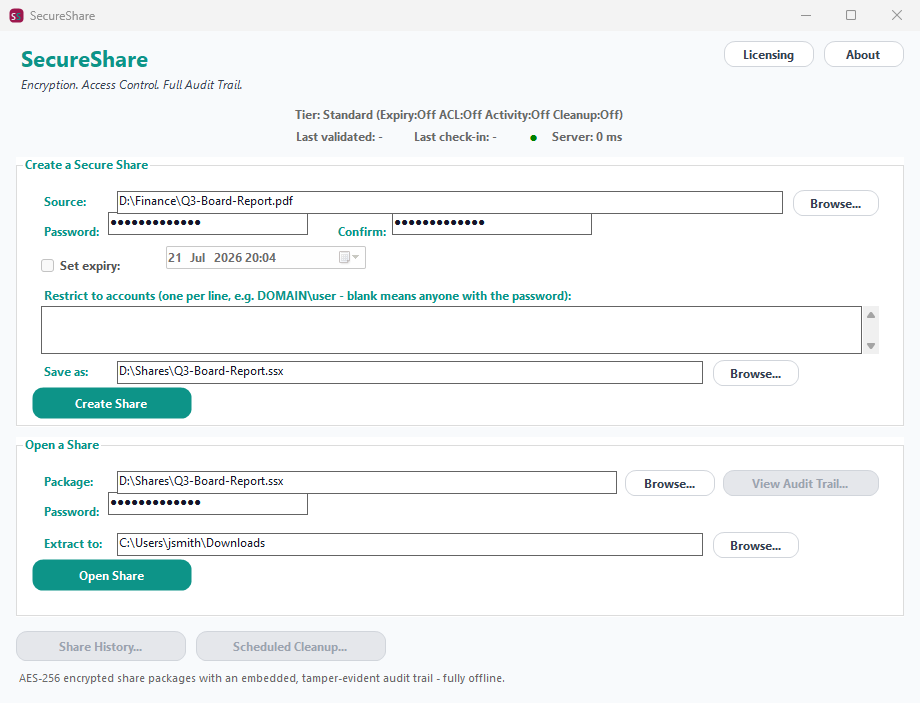
Hover a marker for details, or click the screenshot to zoom in.
AES-256 with an independent HMAC-SHA256, both keys derived from your password - a package is a single portable file, no cloud service or hosting dependency required.
Set an expiry date and a package refuses to open - even with the correct password - once it's passed, so a share doesn't quietly outlive its purpose.
Restrict a package to specific Windows accounts by SID, so a stolen or forwarded copy still can't be opened by someone outside the intended recipient list.
Every open attempt - successful or not - is recorded in a tamper-evident, hash-chained audit trail carried inside the package itself, so activity travels with the file wherever it goes.
A reliable, constant-time "wrong password" check via the package's own MAC - no ambiguous failures, no silently corrupted extractions.
Full history of every share created on this machine with CSV compliance export, plus unattended daily cleanup of expired packages from a watched folder via Windows Task Scheduler.
Pick the level of control you need, then choose once-off or monthly billing. SecureShare licenses per machine, not by data volume.
One-time payment - yours to keep, no subscription.
For sharing a file with a password.
Create and open password-protected AES-256 share packages for a single file or a whole folder.
For shares that shouldn't live forever.
Everything in Standard, plus Expiring Links.
For knowing exactly who opened what.
Everything in Standard+, plus Access Control Lists and Activity Tracking.
For operationalizing sharing at scale.
Everything in Advanced, plus Scheduled Cleanup, Share History, Compliance Report export & a headless CLI.
Prices are shown in USD as the reference figure. Other currencies, including the ZAR amount PayFast actually charges, are converted using a live exchange rate.
Loading live exchange rates...
Standard covers the core of SecureShare: create a password-protected AES-256 share package from any single file or a whole folder, and open a package back with its password. There's no expiry, no access restriction beyond the password, and no visibility into who tried to open it at this tier.
Best for: Anyone who just needs to send a file more safely than plain email attachment.
Standard+ adds Expiring Links - set a date after which a package refuses to open, even with the correct password, so a share doesn't stay valid indefinitely once it's served its purpose. Everything from Standard is included.
Best for: Teams sharing time-sensitive documents, like a report or a contract draft that shouldn't remain accessible forever.
Advanced adds Access Control Lists (restrict a package to specific Windows accounts by SID) and Activity Tracking - view the package's own embedded, tamper-evident audit trail of every open attempt, successful or not, from wherever the file was opened. Everything from Standard+ is included.
Best for: Organizations that need to know exactly who has - or tried to - access a sensitive share, not just trust that the password stayed private.
Professional adds Scheduled Cleanup (unattended daily deletion of expired packages from a watched folder via Windows Task Scheduler), full Share History - every share created on this machine, logged regardless of tier so an upgrade has real history immediately - Compliance Report export (CSV), and the same headless CLI (SecureShare.exe --cleanup <folder>) Scheduled Cleanup itself runs on, available for your own scripts too. Everything from Advanced is included.
Best for: Organizations that need to operationalize secure sharing across a team, not just protect the occasional one-off file.
Prices shown are a suggested starting point, not final quotes - contact us to confirm your plan.