
Network Discovery
Find every device on your network - a live ping/ARP sweep of a given subnet (or the local one) that resolves hostnames, identifies vendors from MAC OUIs, and probes common ports to build a real host inventory.
Find every device on your network - a live ping/ARP sweep of a given subnet (or the local one) that resolves hostnames, identifies vendors from MAC OUIs, and probes common ports to build a real host inventory.
You can't secure or audit what you don't know exists. Network Discovery scans a subnet you give it - or your local one, if you leave the target blank - with a bounded-concurrency ping sweep, resolves whatever hostnames it can via reverse DNS, looks up each responding host's MAC vendor against a built-in OUI table, and probes a fixed list of common management ports (RDP, SSH, SMB, WinRM, HTTP/S) to flag what's actually reachable on each host. Every discovered host lands in one unified list with around 20 built-in queries: reachable/unreachable filters, exposed-port views (RDP/SSH/SMB open), unresolved-hostname and new-host filters, and text/IP searches. Build your own queries with custom filter conditions, export to CSV, Excel, HTML, XML, or the clipboard, and schedule any of it to run unattended.
The real app. Click to zoom in, hover the markers to see what each part does.
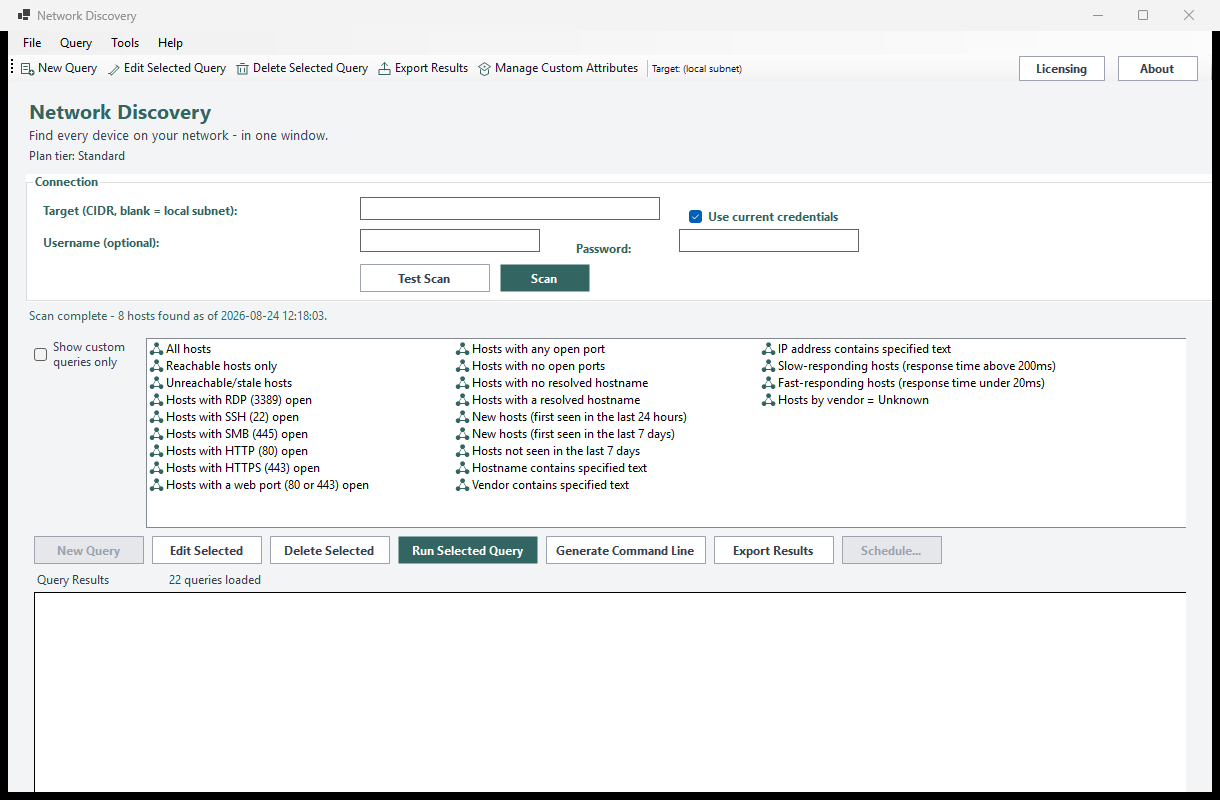
Hover a marker for details, or click the screenshot to zoom in.
Scans a CIDR range you give it (or your local subnet if left blank) with a bounded-concurrency ping sweep and ARP-table cross-reference - a genuine live scan, not a database lookup.
Identifies each host's manufacturer from its MAC address OUI prefix, so you can spot the unexpected device on your network at a glance.
Bounded TCP-connect probes against RDP, SSH, SMB, WinRM, and HTTP/S flag exactly which management surfaces are reachable on each discovered host.
Reachable/unreachable filters, exposed-port views, new/stale-host filters, and text/IP searches - no separate tab per host type, since every host shares the same inventory row shape.
Build your own query from filter conditions on any attribute, and register extra attributes under a friendly display name via Manage Custom Attributes.
Save any query as a recurring report via Windows Task Scheduler, with the result optionally emailed to you afterward - or drive it yourself with NetworkDiscovery.exe --run-report ... and --run-query ....
Pick how much automation you need, then choose once-off or monthly billing. Network Discovery licenses per machine, not by subnet size.
One-time payment - yours to keep, no subscription.
For a basic host inventory.
The ping/ARP host sweep, on screen, free at every tier.
For exposure visibility.
Everything in Standard, plus open-port probing and CSV/Text export.
For deeper investigation.
Everything in Standard+, plus custom queries, vendor-lookup detail, and richer export formats.
For fully unattended scans.
Everything in Advanced, plus scheduled & emailed reports and a headless CLI.
Prices are shown in USD as the reference figure. Other currencies, including the ZAR amount PayFast actually charges, are converted using a live exchange rate.
Loading live exchange rates...
Standard covers the core of any host inventory: the live ping/ARP sweep, hostname resolution, and the full built-in query catalog - all on screen. No open-port probing or export at this tier, by design.
Best for: Anyone who needs a fast answer to "what's actually on this subnet right now?"
Standard+ adds the common-port exposure probe (RDP/SSH/SMB/WinRM/HTTP-S) plus CSV/Text report export. Everything from Standard is included.
Best for: Day-to-day visibility into which discovered hosts have management ports open.
Advanced adds custom queries with Manage Custom Attributes, richer MAC-vendor detail, and Excel/HTML/XML/clipboard export. Everything from Standard+ is included.
Best for: IT teams building their own asset-inventory reports.
Professional adds scheduled scans via Windows Task Scheduler with optional email delivery, and a headless CLI (NetworkDiscovery.exe --run-report, --run-query, --run-custom-query). Everything from Advanced is included.
Best for: Organizations that want a recurring, self-updating network inventory running itself.
Prices shown are a suggested starting point, not final quotes - contact us to confirm your plan.