
Network Configuration Manager
See what a target machine's network is actually configured to do, and fix it - safely. The first write-capable tool in the Network Management line.
See what a target machine's network is actually configured to do, and fix it - safely. The first write-capable tool in the Network Management line.
Network Access Reporter and Network Change Auditor tell you what's there and what changed. Network Configuration Manager is the one that fixes it - safely. It reads a target machine's real firewall rules, IP configuration, static routes, and DNS servers into one unified inventory with 23 built-in queries, and - the first write-capable tool in this line - lets you create/delete firewall rules and change IP/DNS/routes through the exact same staged review-before-apply workflow Active Directory Group Policy Manager pioneered: every write action only ever queues a change; nothing reaches the target machine until you explicitly review and click Apply in the Pending Changes dialog, with a full local audit trail of every attempt. Unlike every other tool in this line, Network Configuration Manager requires an explicit target hostname or IP - there's no "blank = local machine" shortcut, since accidentally reconfiguring your own workstation's network would be the worst possible failure mode for this kind of tool.
The real app. Click to zoom in, hover the markers to see what each part does.
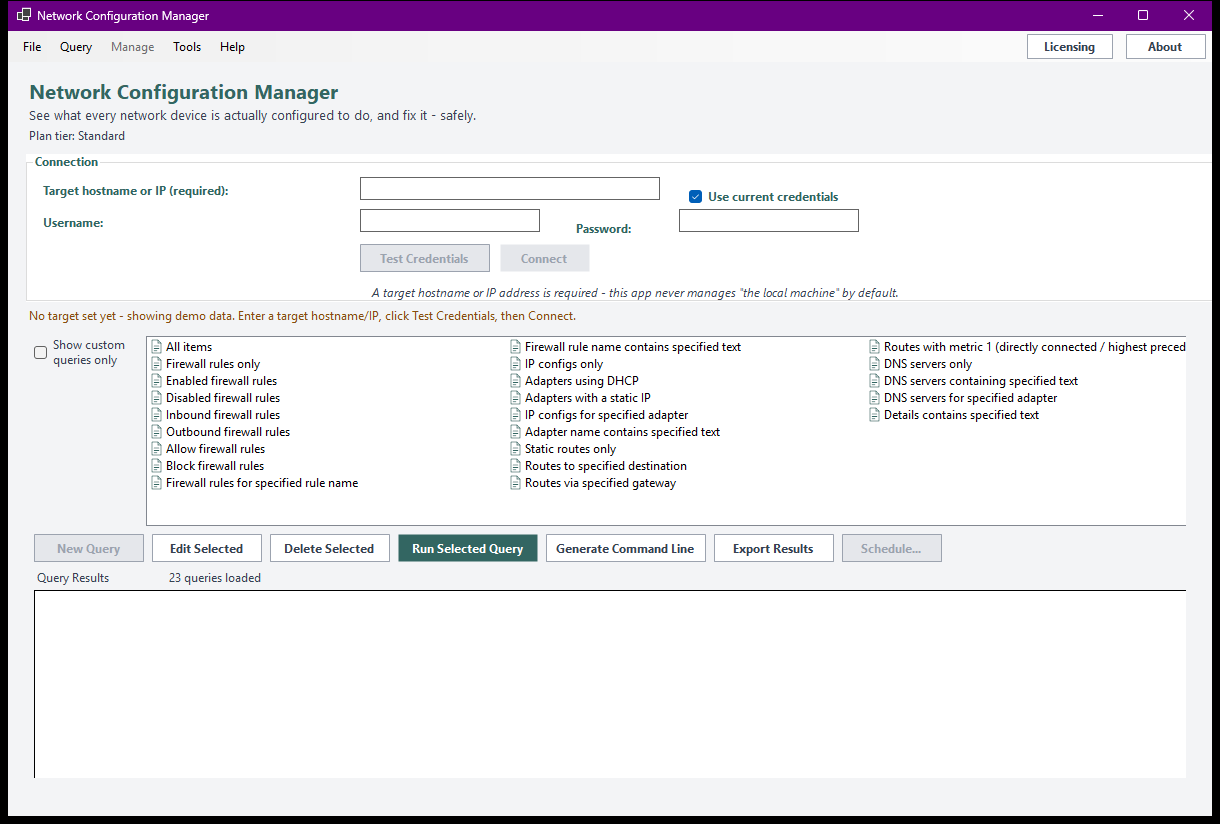
Hover a marker for details, or click the screenshot to zoom in.
Firewall rules, IP configuration, static routes, and DNS servers, read directly from the target machine - one unified list, 23 built-in queries.
Every write action - new rule, delete rule, set static IP, change DNS, add/remove a route - only ever queues a change. Nothing reaches the target until you review it in Pending Changes and click Apply.
No "blank = local machine" shortcut - you always point this tool at an explicit hostname or IP, so you can never accidentally reconfigure the machine you're sitting at.
Every apply attempt - success or failure - is logged, one item at a time, so nothing writes silently and one failure never aborts the rest of a batch.
Build your own query from filter conditions on any attribute, and register extra attributes under a friendly display name via Manage Custom Attributes.
Save any query as a recurring report via Windows Task Scheduler, with the result optionally emailed to you afterward. The headless CLI stays read-only even at Professional - there's no --apply-changes flag, ever.
Pick how much automation you need, then choose once-off or monthly billing. Network Configuration Manager licenses per machine.
One-time payment - yours to keep, no subscription.
For a basic rule inventory.
Firewall rule inventory, on screen, free at every tier.
For the complete inventory.
Everything in Standard, plus IP/route/DNS inventory rows and CSV/Text export.
For deeper reporting.
Everything in Standard+, plus custom queries and richer export formats.
The real differentiator.
Everything in Advanced, plus full write management (create/delete rules, set IP/DNS, add/remove routes), scheduled & emailed reports, and a read-only headless CLI.
Prices are shown in USD as the reference figure. Other currencies, including the ZAR amount PayFast actually charges, are converted using a live exchange rate.
Loading live exchange rates...
Standard covers the core of any config audit: the firewall rule inventory and the full built-in query catalog - all on screen, read-only. No IP/route/DNS rows, write management, or export at this tier, by design.
Best for: A first look at what a target machine's firewall is actually configured to do.
Standard+ adds IP configuration, static route, and DNS server inventory rows, plus CSV/Text report export. Everything from Standard is included. Still entirely read-only.
Best for: Full network-config visibility across a fleet, before you ever change anything.
Advanced adds custom queries with Manage Custom Attributes and Excel/HTML/XML/clipboard export. Everything from Standard+ is included. Still entirely read-only.
Best for: IT teams building their own network-config compliance reports.
Professional is the real differentiator: full write management - create/delete firewall rules, set static IP, change DNS servers, add/remove routes - all through the staged review-before-apply workflow, plus scheduled reports via Windows Task Scheduler with optional email delivery, and a headless CLI that stays read-only even here. Everything from Advanced is included.
Best for: Teams ready to actually fix what they find, with a full audit trail and nothing applied without explicit review.
Prices shown are a suggested starting point, not final quotes - contact us to confirm your plan.
Contact us for current pricing and licensing options.
Contact us