USM
Move a user onto a new PC without losing a single setting, bookmark, or saved credential - in minutes, not a support ticket.
Move a user onto a new PC without losing a single setting, bookmark, or saved credential - in minutes, not a support ticket.
USM (User State Migration) captures a user's data, personalization, browser bookmarks, application settings, and select credentials/hardware links, then restores them onto a new or rebuilt machine - either into an encrypted package for later restore, or transferred live, machine-to-machine over the network, with no package ever written to disk. Every file copy is MD5-verified end to end.
The real app. Click to zoom in, hover the markers to see what each part does.
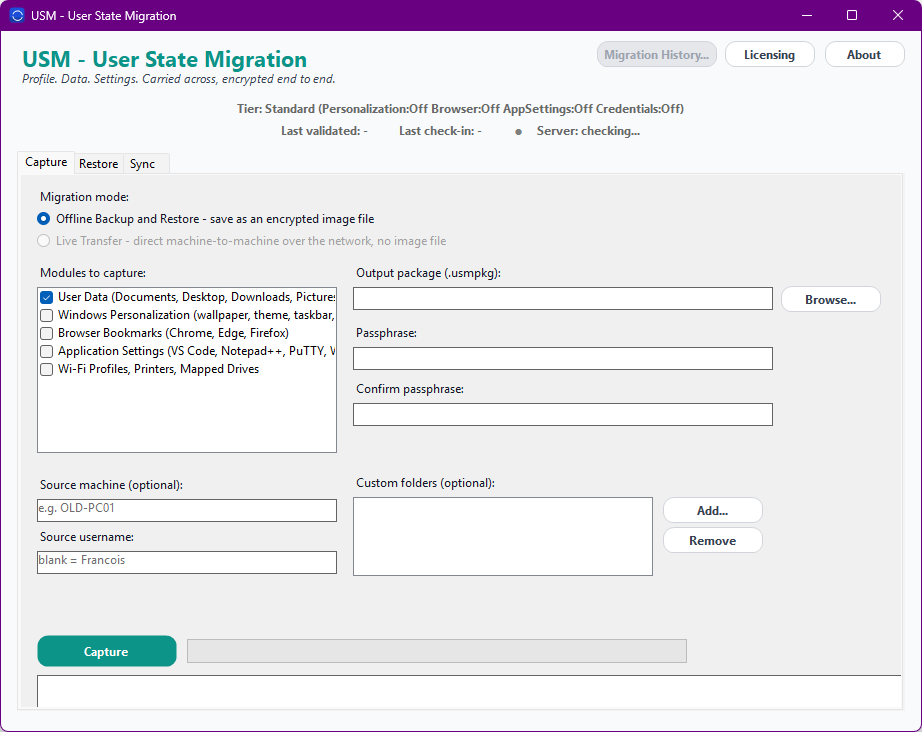
Hover a marker for details, or click the screenshot to zoom in.
Documents, Desktop, Downloads, Pictures, Videos, Music, and browser Favorites - captured with a resilient, directory-by-directory copy that keeps going even past a stray permission error.
Wallpaper, theme, taskbar layout, regional settings, and keyboard configuration - so the new machine looks and behaves like the one it replaced.
Bookmarks and settings from Chrome, Edge, and Firefox, carried over without asking the user to re-sign-in or rebuild a bookmark bar from memory.
Configuration for VS Code, Notepad++, PuTTY, WinSCP, FileZilla, and Outlook signatures - the small per-app setup that otherwise gets rebuilt from memory, app by app.
Saved Wi-Fi profiles, mapped network drives, and printer connections - reconnected on the new machine instead of re-entered by hand.
Point straight at the old machine's C$ admin share and migrate directly to the new one over the network - MD5-verified end to end, with no encrypted package ever written to disk.
Pick the depth of migration you need, how many machines you're migrating, then choose once-off or monthly billing.
One-time payment - yours to keep, no subscription.
For a straightforward data move.
User data capture and restore into an encrypted package, offline backup and restore only.
For a machine that feels the same, not just has the same files.
Everything in Standard, plus Personalization and Browser Migration.
For IT teams doing this over the network, not just from a package.
Everything in Standard+, plus Application Settings, Credentials/Hardware Migration, Filtering, and Live Transfer.
For running migrations at scale, unattended.
Everything in Advanced, plus Headless CLI/Automation and full Migration History.
Prices are shown in USD as the reference figure. Other currencies, including the ZAR amount PayFast actually charges, are converted using a live exchange rate.
Loading live exchange rates...
Standard covers the core of USM: capturing a user's Documents, Desktop, Downloads, Pictures, Videos, Music, and browser Favorites into an MD5-verified encrypted package, then restoring that package onto a new or rebuilt machine. Offline backup and restore only - no personalization, browser settings, app settings, credentials, or live network transfer at this tier.
Best for: A straightforward, one-off data move where the files themselves are what matters.
Standard+ adds Personalization (wallpaper, theme, taskbar layout, regional and keyboard settings) and Browser Migration (bookmarks and settings from Chrome, Edge, and Firefox) - so the new machine looks and feels like the old one, not just contains the same files. Everything from Standard is included.
Best for: Teams that want the new machine to feel familiar on day one, not just functional.
Advanced adds Application Settings (VS Code, Notepad++, PuTTY, WinSCP, FileZilla, Outlook signatures), Credentials/Hardware Migration (Wi-Fi profiles, mapped drives, printer connections), source-side Filtering, and Live Transfer - migrating directly from the old machine's C$ admin share to the new one over the network, MD5-verified end to end, with no package ever written to disk. Everything from Standard+ is included.
Best for: IT teams doing machine-to-machine refreshes over the network, not one-at-a-time from a USB drive.
Professional adds Headless CLI/Automation - scriptable capture, restore, and live-transfer runs with no UI required - plus full Migration History across every run, regardless of tier. Everything from Advanced is included.
Best for: Organizations rolling out machine refreshes at scale, where migrations need to be scripted and audited, not clicked through one at a time.
Prices shown are a suggested starting point, not final quotes - contact us to confirm your plan.