
Storage Insights
Stop guessing where your storage went. See duplicates, stale data, and orphaned files - and exactly where capacity is headed next.
Stop guessing where your storage went. See duplicates, stale data, and orphaned files - and exactly where capacity is headed next.
Storage Insights crawls file servers, NAS devices, and mapped shares to map storage utilization end to end - capacity by folder, duplicate files, stale and orphaned data, large files, and file age. Analytics, forecasting, and rule-based recommendations turn that picture into a concrete plan for reclaiming space and cutting storage costs, with every scan running entirely offline.
The real app. Click to zoom in, hover the markers to see what each part does.
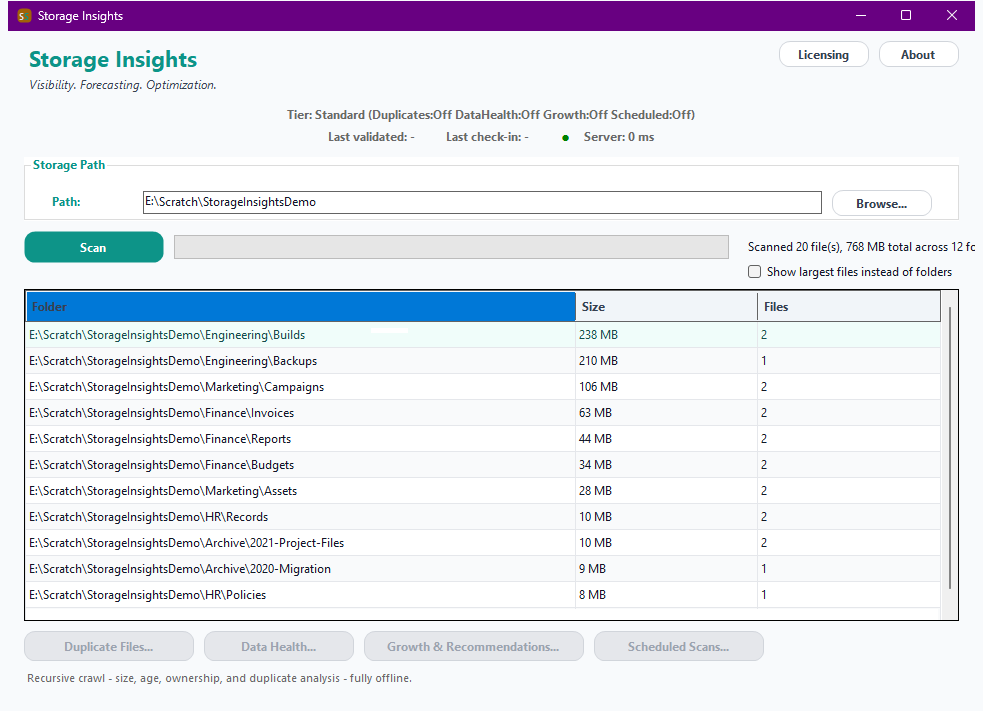
Hover a marker for details, or click the screenshot to zoom in.
A full recursive scan of any local path, mapped drive, or mounted NAS/SMB share - per-folder size and file-count breakdown, plus a largest-files view.
Groups files by exact size first, then hashes only the ones that actually share a size with another file - fast even on large volumes, with reclaimable space reported per group.
Flags files untouched by both read and write for a long time, and files whose owner SID no longer resolves to a live account - the classic sign of data left behind by a departed user.
Rolls storage up by recorded owner, so you know exactly who to talk to about the largest or oldest files sitting on your shares.
A simple, explainable linear trend from this location's own scan history - "growing at ~2GB/day" - not a black-box model, so you can see exactly why a capacity warning was raised.
Rule-based suggestions derived directly from what's already been found - reclaimable duplicate space, stale-data archival candidates, capacity warnings - plus unattended recurring scans via Windows Task Scheduler.
Pick the depth of analysis you need, then choose once-off or monthly billing. Storage Insights licenses per machine, not by data volume.
One-time payment - yours to keep, no subscription.
For a first look at where space is going.
Full recursive crawl with per-folder size/file-count breakdown and a largest-files report.
For reclaiming space that's just sitting duplicated.
Everything in Standard, plus Duplicate Detection.
For finding data no one's responsible for anymore.
Everything in Standard+, plus Stale Data Detection, Orphaned Data Detection, and Ownership Reports.
For operationalizing storage management at scale.
Everything in Advanced, plus Growth Forecasting, Recommendations, Scheduled Scans & a headless CLI.
Prices are shown in USD as the reference figure. Other currencies, including the ZAR amount PayFast actually charges, are converted using a live exchange rate.
Loading live exchange rates...
Standard covers the core of Storage Insights: a full recursive crawl of any local path, mapped drive, or mounted share, with a per-folder size and file-count breakdown and a largest-files report - the baseline "where is my space going" view. There's no duplicate, stale, or orphaned-data analysis at this tier.
Best for: Anyone taking a first look at where storage is actually going on a share or volume.
Standard+ adds Duplicate Detection - files are grouped by exact size first, then only hashed if they share a size with another file, so even large volumes scan quickly. Reclaimable space is reported per duplicate group. Everything from Standard is included.
Best for: Teams looking to reclaim space that's already sitting duplicated across shares.
Advanced adds Stale Data Detection (files untouched by both read and write for a long time), Orphaned Data Detection (owner SID no longer resolves to a live account), and an Ownership Report rolling storage up by owner. Everything from Standard+ is included.
Best for: Organizations that need to find data nobody's responsible for anymore, and know exactly who to talk to about what remains.
Professional adds Growth Forecasting (a simple, explainable linear trend from this location's own scan history), rule-based Recommendations derived directly from what's already been found, Scheduled Scans (unattended, recurring crawls via Windows Task Scheduler), and a headless CLI (StorageInsights.exe --scan <folder>) for scripted or Task-Scheduler-driven crawls. Everything from Advanced is included.
Best for: Organizations that need to operationalize storage management - not just see the picture once, but keep watching it and act on what changes.
Prices shown are a suggested starting point, not final quotes - contact us to confirm your plan.