Animated magnifying glass sweeping over a fingerprint, showing its ridges sharply inside the lens and marking four findings on its way round

Forensic Offline

Find the personal information in databases and logs - offline, with the evidence left untouched. Forensic Offline scans SQLite databases, JSONL and JSON files for personal and system information, including records that were deleted.

14 days free, everything on R49 a month, billed yearly Or R999 once, for life Scans completely offline

An app's database copied off a laptop, a folder of exported logs, a backup nobody has looked at in years - what personal information is in there, and where? Add the files or whole folders, press Start scan, and Forensic Offline reads every table, row and line on your own PC. It lists each ID number, email address, phone number, account number, computer name, password and key it finds, with where it found it - including records that were deleted but are still in the database's free space. The files themselves are never changed: each one is hashed before and after, and databases are copied before they're opened.

See it in action

What was found, in which file, at a glance

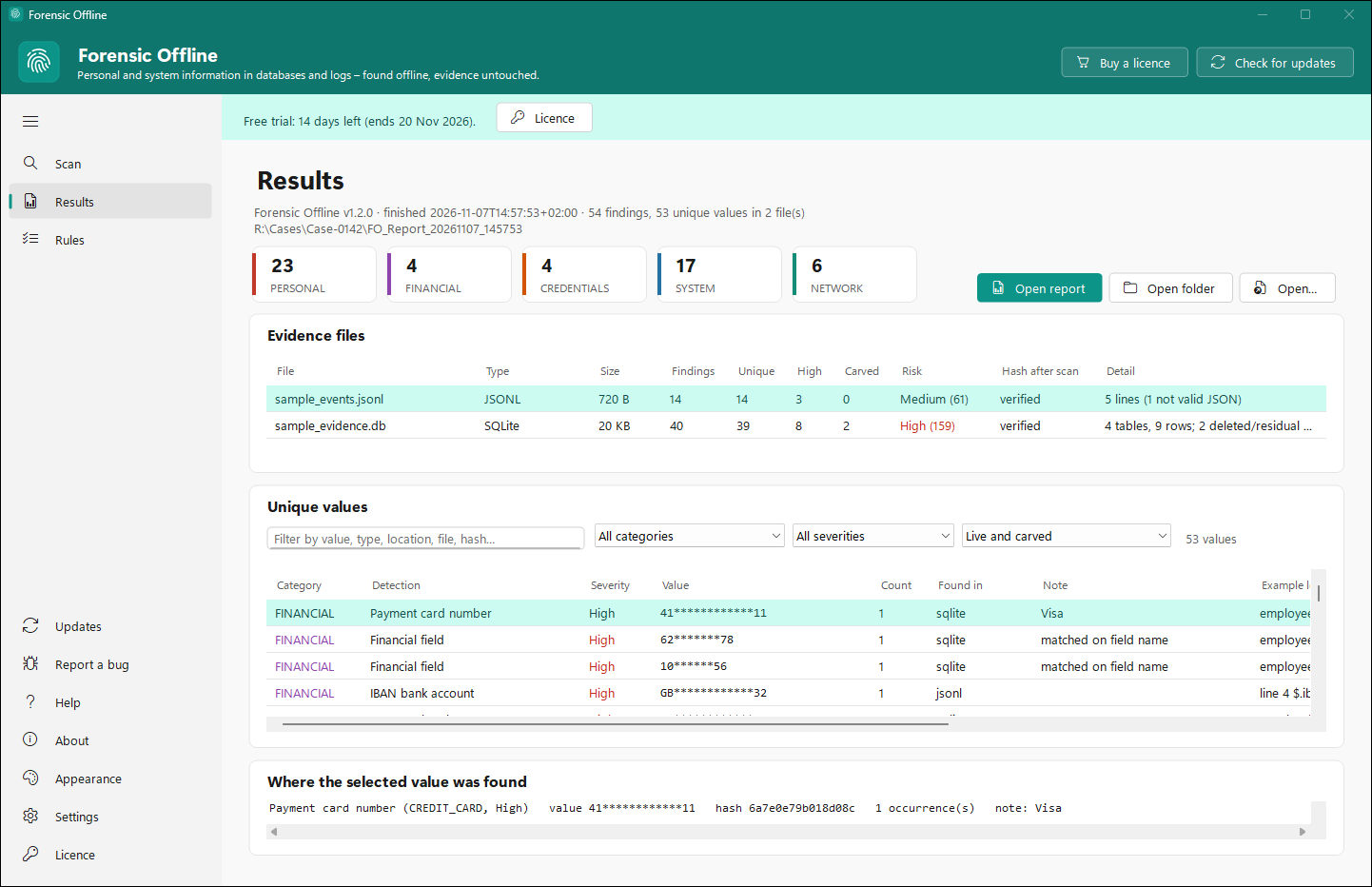
The real app showing a report of made-up sample data: a test employee database and an event log written for the purpose. Values are masked, as they are by default. The copy in the picture is on its 14-day free trial, hence the line at the top. Click the picture to zoom in.

Totals by categoryPersonal, financial, credentials, system and network - how many unique values of each the scan found.
Every evidence fileIts findings, how many came from deleted data, a risk rating, and whether its hash still matched after the scan.
Every unique valueFilter and sort them, then select one to see each place it was found, with the text around it.
Forensic Offline's Results page, zoomed in
Features

Find it, prove you didn't touch it, report it

Personal information

South African ID numbers (with their date and check digit validated), email addresses, phone numbers, addresses, names, bank account and card numbers, and the POPIA special personal information that columns and fields are named for - health, religion, biometrics and the like.

System information

Computer names, usernames, IP and MAC addresses, Windows SIDs, user folders and network paths, internal domain names - and the passwords, tokens and private keys that end up in logs and settings.

Deleted records, recovered

A deleted row often stays in a SQLite database's free space, and older versions sit in its -wal and -journal files. Forensic Offline reads those too and marks what it recovered as carved, apart from the live data.

Evidence left untouched

Every file is hashed (MD5 and SHA-256) before and after the scan, and a changed hash is flagged. Databases are copied before SQLite opens them. A file another program has open is skipped with a note, and the scan carries on.

Masked unless you say otherwise

Values are masked in the app and in the reports. Reveal values shows them in full only after it asks, with a warning that the reports then hold personal information - and it's switched off again every time Forensic Offline starts.

Results you can work through

Totals by category, a risk rating for each file, and every unique value in a list you can filter and sort. Select a value to see each place it was found. Earlier report folders open here too.

Rules for your organisation

Tell it your computer-name prefixes and internal domains, values and patterns to ignore, detections to switch off and patterns of your own - then try the rules on pasted text before you scan.

A command line too

--scan a file or folder with the same options as the window, from a script or a scheduled task, with clear exit codes. --self-test checks the scanner on built-in fake data.

Offline, all the way

Scanning never uses the internet, and nothing it reads leaves your PC. Only the licence check and the update check go online.
What it finds

Five kinds of finding

Each value is found by a pattern, checked where it can be (a check digit, a card number's checksum, an IBAN), or flagged because of the field it sits in - and rated High, Medium or Low.

Personal

  • SA ID numbers, email addresses, phone numbers
  • Addresses, names and GPS coordinates
  • Fields named for health, religion, biometrics and other special personal information

Financial

  • Card numbers that pass the Luhn check, with the brand
  • IBANs that pass their check
  • Bank account numbers in account fields

Credentials

  • Passwords in settings and connection strings
  • Tokens, API keys and private keys
  • User names and passwords inside web addresses

System

  • Computer names and DOMAIN\user names
  • Windows SIDs, user folders and network paths
  • Serial numbers, machine IDs and Windows versions

Network

  • IP addresses, public and internal
  • MAC addresses
  • Your organisation's internal domain names

Your own

  • Patterns you add, in the category and severity you choose
  • Values and patterns to leave out
  • Any detection switched off
SQLite: .db .sqlite .sqlite3 .db3 .sdb, with their -wal and -journal JSONL: .jsonl .ndjson .jsonlines JSON: .json Single files or whole folders, sub-folders included Big files read in pieces
Reports

Five files in the report folder

Every scan writes its own folder, so a case keeps its reports together - even a cancelled scan writes what it found so far.

report.htmlTotals, each file's risk, findings by type and a table of unique values you can filter - opens in any browser.
findings.csvEvery occurrence, one per row, ready for Excel.
findings.jsonlThe same occurrences for your own tools and scripts.
summary.jsonThe totals and each file's risk score.
manifest.jsonChain of custody: each file's hashes before and after, the times, the examiner's PC and user, the version, the options and the rules used.
A risk rating per fileEach unique value counts High 10, Medium 3 or Low 1; the total rates the file None, Low, Medium, High or Critical.
How it works

Four steps to your first report

  1. Add the evidenceAdd files or folders, or drag them in. Sub-folders are included unless you untick it.
  2. Choose what to findAll five categories or just some, the lowest severity, and whether to recover deleted data.
  3. ScanWatch the progress and the log. Cancel any time - you still get a report of what was found.
  4. Review and reportWork through the results, then open report.html or hand over the report folder.
Pricing

Two ways to own it. Everything included in both.

Try every feature free for 14 days, then pick the plan that suits you. Prices are in Rand, with the US dollar equivalent as a guide; checkout is PayFast's secure payment page.

Yearly

Pay a year at a time, cancel whenever you like

R49 / month
R588 billed once a year
  • Every feature and every update while you're subscribed
  • Renews by itself each year until you cancel
  • Cancel from your StreamSoft account; you keep Forensic Offline until the paid year ends

Both plans include

  • Personal and system information, all five categories
  • Deleted records recovered from databases
  • Hashes before and after, chain-of-custody manifest
  • All five reports, masked or revealed
  • Rules for your organisation
  • The command line

Each licence is for one PC. Need Forensic Offline on several PCs? Talk to us.

Download

Start your free trial

Get Forensic Offline

Download the setup and run it: Forensic Offline installs in under a minute, with a Start menu entry and, if you like, a desktop icon. Every feature is on for 14 days once you confirm the email you downloaded it with, no card needed. When you buy, we email your licence key; paste it into Forensic Offline's Licence page and you're done. If the trial ends before you buy, new scans stop until it's licensed - earlier reports still open. Uninstalling keeps your settings, rules and reports.

Download Forensic Offline 1.2.1

ForensicOfflineSetup-1.2.1.exe - 45.8 MB - Windows 10/11, 64-bit

What you need

  • Windows 10 or Windows 11, 64-bit
  • Administrator rights to install it; nothing else to download - .NET and SQLite are built in
  • An internet connection to activate, and now and then to check the licence - scanning itself never goes online
  • Room in your temp folder for a copy of the largest database you scan (the copies are deleted afterwards)
Questions

Good to know

Does anything I scan leave my PC?

No. The scan runs entirely on your PC and nothing it reads is sent anywhere. Forensic Offline only goes online to check its licence and to look for updates.

Will scanning change the files?

No. Each file is hashed with MD5 and SHA-256 before and after the scan, and the report says whether the hashes still match. SQLite databases are copied to a temporary folder before SQLite opens them, and the copies are deleted afterwards.

Will it find everything?

It finds what its rules recognise: patterns, checks such as check digits, and field and column names. It isn't AI - a name in free text is found only in a field meant for names, a column simply called "name" is flagged Low for you to check, and recovered deleted data can be in pieces. Treat the results as leads for an examiner to confirm.

Does it tell me whether I'm POPIA compliant?

No. Forensic Offline reports what it finds and where; it isn't legal advice. What a finding means for you under POPIA or any other law is for you and your advisers to decide.

Why was a file skipped as locked?

Another program had it open - a browser's history, Teams or Outlook, say. Close that program, or scan a copy (a Volume Shadow Copy, for example). The rest of the scan carries on either way.

Who can see the values in the reports?

Anyone who opens them, so values are masked by default. If you tick Reveal values, the reports hold the full values - personal information to be handled as confidential. Reveal is never remembered between runs.

Yearly or Lifetime - which should I choose?

Yearly costs R588 a year (R49 a month) and renews until you cancel. Lifetime is R999 once and never renews. If you'll use Forensic Offline for more than about two years, Lifetime costs less.

How do I cancel the yearly plan?

Sign in to your StreamSoft account and choose Cancel subscription on the order. Forensic Offline stays fully on until the year you've paid for ends, and you won't be charged again.

How many PCs does a licence cover?

One. Moving to a new PC? Choose Deactivate on this PC on Forensic Offline's Licence page, then activate it on the new one - or ask us to free the licence. For several PCs, get in touch.

How do I pay, and when do I get my key?

Checkout is PayFast's secure page, so we never see your card details. We email your licence key once the payment has gone through.

Know what's in the data

Fourteen days free with everything on - then R49 a month billed yearly, or R999 once.

Start your free trial