Record it once. Play it back as often as you like. Loop records your mouse and keyboard and plays them back - once, a set number of times, for ever, for a while, or until a time of day.
Typing the same order numbers into the same form, clicking through the same screens every morning, refreshing a dashboard all day. Press Record, do the job once, press Stop - Loop keeps every click, key press and pause, tidied into steps you can read. Play it back at any speed, as many times as you need. When the job needs a little thinking, add it: wait until a window opens or a picture appears on screen, read the next line of a file, repeat a few steps, or stop when the list runs out.
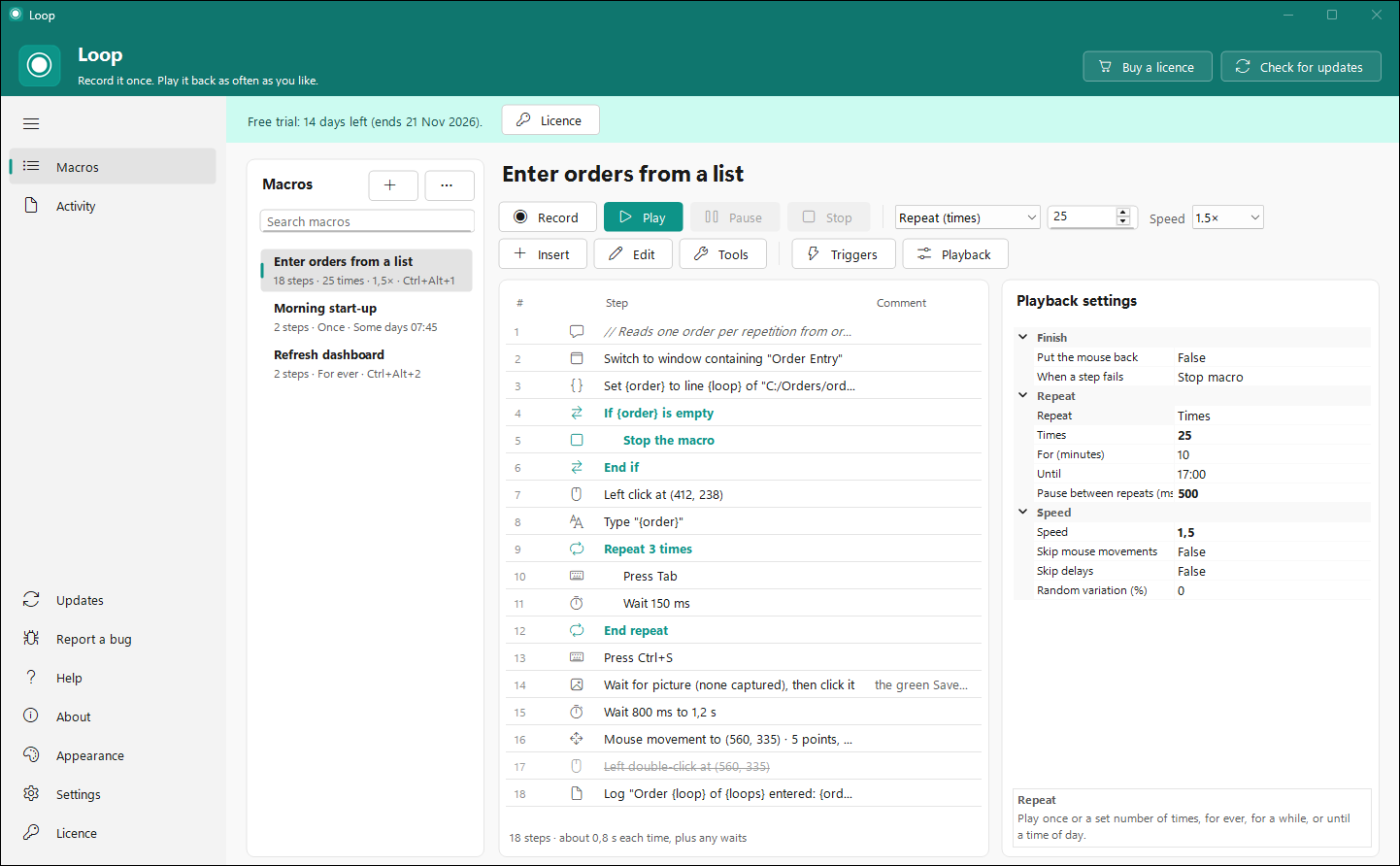
The real app with a demo macro that enters a list of orders into a form, 25 times over. Click the picture to zoom in.
Mouse movement, clicks with all five buttons, the scroll wheel and the keyboard, with your real timing or a fixed delay. A press and release becomes one click, two quick clicks a double-click, and Ctrl + S one step - not three.
Any speed from 0.05x to 100x. Skip the mouse movement or the delays, add a little random variation, pause and resume. Press Esc or your Stop hotkey and it stops - and any key or button the macro was holding is always let go.
Wait until a window opens, comes to the front or closes, until a spot turns a certain colour, until a picture shows up on screen - then click it - or until you press a key. Each wait can give up after a while and carry on, stop, or jump elsewhere.
If / Else, Repeat a number of times, Repeat while something is true, labels and Go to, Stop, and running one macro from another. Check a variable, a pixel, a picture, a window, a running program, a file, the clipboard or a held key.
Read a file line by line - one order, one name, one row per repeat - do sums, change text, and type the result. Ready-made values for the date, time, repeat number, clipboard, mouse position and more.
Insert, move, copy, switch off or wrap steps in a Repeat or an If, with 200 levels of undo. Pick a point on screen with a magnifier, capture a picture to wait for, and let Loop check the macro for loose ends.
Give each macro its own key combination to start it from anywhere - press it again to stop. Or play it from the tray menu without opening Loop at all.
Export a macro as its own .exe that plays it on any PC, or put it on the desktop as a shortcut that plays it with a double-click.
What played and when, how each run ended, and anything your macros wrote to the log along the way - so an overnight run can tell you how it went.
Choose how long a macro keeps going, and how it behaves while it does.
Recorded for you, or added by hand from the Insert menu.
Loop keeps running in the tray when you close its window, and can start with Windows.
Try every feature free for 14 days, then pick the plan that suits you. Prices are in Rand, with the US dollar equivalent as a guide; checkout is PayFast's secure payment page.
Pay a year at a time, cancel whenever you like
Pay once, yours for good
Each licence is for one PC. Need Loop on several PCs? Talk to us.
Download the setup and run it: Loop installs in under a minute, with a Start menu entry and, if you like, a desktop icon. Every feature is on for 14 days once you confirm the email you downloaded it with, no card needed. When you buy, we email your licence key; paste it into Loop's Licence page and you're done. If the trial ends before you buy, Loop stops recording and playing until it's licensed - your macros are kept.
Download Loop 1.2.0LoopSetup-1.2.0.exe - 44.7 MB - Windows 10/11, 64-bit
Press Esc, your Stop hotkey, or Stop on the little status bar Loop shows while it plays. A macro started by its own hotkey also stops when you press that hotkey again. Any key or mouse button the macro was holding down is released, so nothing is left stuck.
Not if you add a wait. Instead of a fixed delay, have the macro wait until the window opens or comes to the front, until a spot on screen changes colour, or until a picture - a button, say - appears, then carry on. You choose what happens if it never does.
Yes. Export it as a program and Loop makes a standalone .exe that plays the macro by itself on any PC. You can also export the macro as a file and import it into Loop on the other PC.
That program is probably running as administrator. Windows doesn't let ordinary programs send clicks and key presses to it, so run Loop as administrator too.
Yearly costs R588 a year (R49 a month) and renews until you cancel. Lifetime is R999 once and never renews. If you'll use Loop for more than about two years, Lifetime costs less.
A Lifetime licence keeps working with every new version of Loop we release - new features included. There's no paid upgrade to a "Loop 2".
Sign in to your StreamSoft account and choose Cancel subscription on the order. Loop stays fully on until the year you've paid for ends, and you won't be charged again.
One. Moving to a new PC? Choose Deactivate on this PC on Loop's Licence page, then activate it on the new one - or ask us to free the licence. For several PCs, get in touch.
Checkout is PayFast's secure page, so we never see your card details. We email your licence key once the payment has gone through.
Fourteen days free with everything on - then R49 a month billed yearly, or R999 once.
Start your free trial