Sit the exam before you sit the exam. StreamSoft Learn gives you practice exams that work like the real test centre - one question at a time against the clock, mark for review, a review screen, and a scaled score out of 1000 with a report for every domain.
Knowing the work is half of passing a certification exam. The other half is the exam itself: three hours on the clock, questions that ask for the BEST answer, drag-and-drop and diagrams, a case study you can't go back to. StreamSoft Learn lets you practise all of it before the day. Sit a full timed exam in a window that looks and behaves like a test centre's, see your scaled score and how you did in every domain, then go through every question with the right answer and why. Or practise one domain at a time and check each answer as you go. There are 25 exams: nine from ISC2 - the CISSP, CC, SSCP, CCSP, CSSLP, CGRC and the three CISSP concentrations - and sixteen from ISACA - CISA, CISM, CRISC, CGEIT, CDPSE, CCOA, the AI and CMMC exams and five certificates - in the app or in your browser, with more to follow.
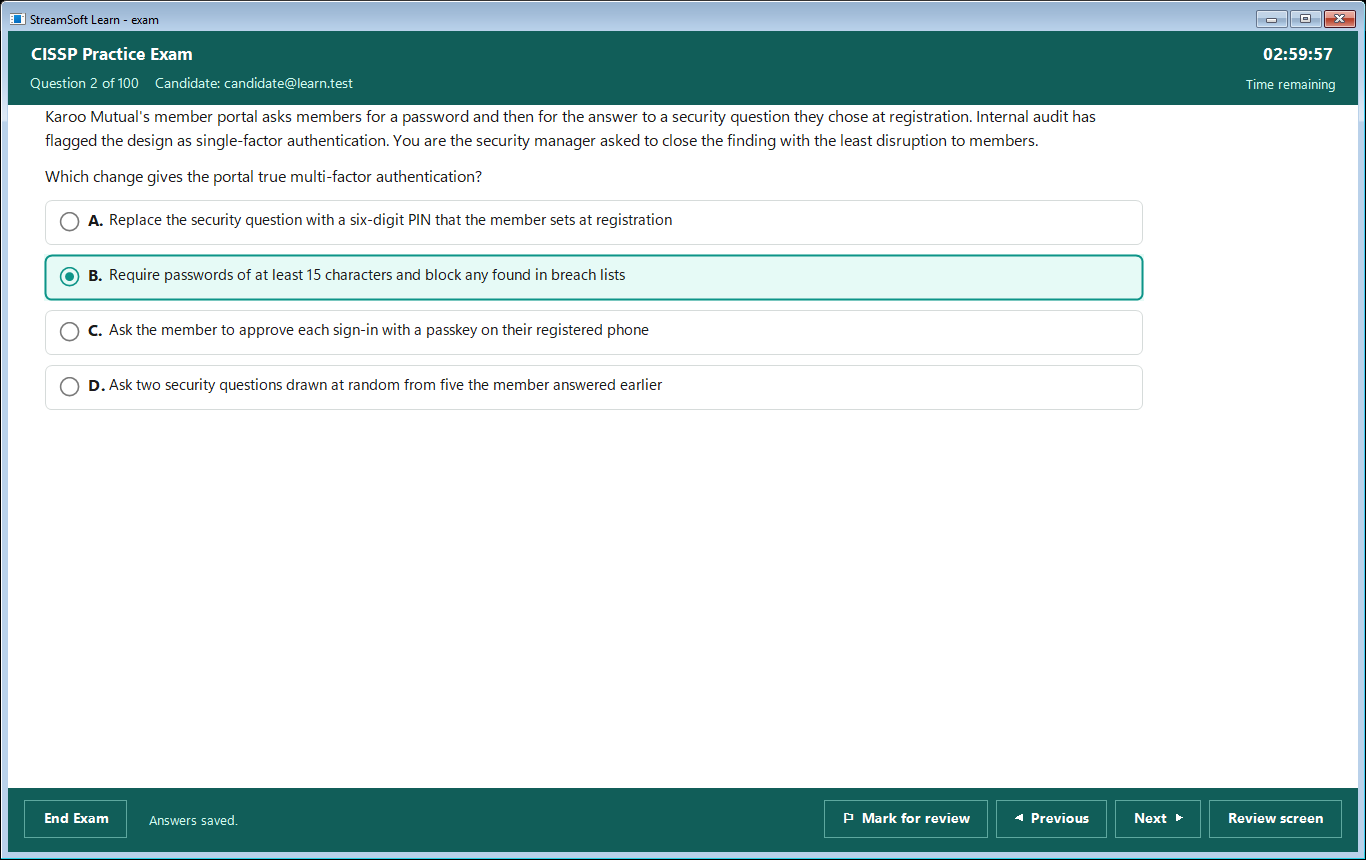
Real screens from the CISSP Practice Exam. Pick a screen below, and click the big picture to zoom in.
One answer. Click it or press its letter. The clock counts down at the top right, and your answers are saved as you go.
Grouped by the body that certifies them: ISC2, ISACA and CompTIA today, with Microsoft, AWS, Cisco and EC-Council coming. Each is built against its published exam outline, and every exam has a free sample, so you can try it before you buy a pass.
Security leadership and engineering, against the 2024 outline. Timed exams drawn from every domain in proportion, scored the way the real exam scores.
From the entry-level CC to the CISSP concentrations - cloud, software, operations, governance and compliance, architecture, engineering and management - each against ISC2's current published outline.
IT audit, security management, risk, governance, privacy, AI and CMMC - each against ISACA's published outline, from the auditor's, manager's or risk practitioner's point of view.
From Tech+ and A+ through Network+ and Security+ to CySA+, SecurityX, cloud, Linux, servers, data, projects and AI security - vendor-neutral and job-role based, each against CompTIA's current published objectives.
Every timed exam is scored out of 1000 against a pass mark of 700. Take them in the StreamSoft Learn app or in your browser at learn.streamsoft.co.za. Prices and passes are there; Monthly and Lifetime open every exam.
One question at a time with the clock at the top right - click it to hide it. When it reaches zero the exam ends by itself. Answers and explanations are shown only after you choose End Exam, just like the real thing.
Not sure? Flag the question with Alt + M and come back to it later. Every button has a keyboard shortcut, as at a test centre.
See every question as answered, incomplete or unanswered, with a flag on the marked ones. Jump to any of them, or go through just the incomplete or just the marked ones.
Right-click an option to strike it out as a note to yourself while you narrow it down. It doesn't change your answer.
Exhibits open in their own window. A case study shows its scenario in tabs on the left and its questions on the right - and, as in the real exam, once you leave it you can't go back.
Choose the domains, how many questions and whether to work against the clock. Check answer shows straight away whether you were right, with the explanation.
A scaled score against the pass mark, PASS or FAIL, and how you did in each domain - so you know exactly what to study next. Save it as a web page to keep.
Every finished session stays in your history with its score report. Open one to go through each question: your answer, the right answer and why.
Your answers are saved every 30 seconds and whenever you move. If the connection drops, carry on; if the window closes, choose Resume and pick up where you left off.
The kinds of question the real exams ask, answered the same way.
The dress rehearsal: the whole exam, against the clock, under test-centre rules.
The study session: pick what you need to work on and learn as you go.
The app and a sample of every exam are free. Monthly and Lifetime unlock every exam, new ones included, with a StreamSoft licence key you add to your account once. Prices are in Rand, with the US dollar equivalent as a guide; checkout is PayFast's secure payment page.
Every exam, cancel whenever you like
Pay once, every exam for good
One exam, 30 or 90 days, paid once
Not sure yet? Create a free account and sit the free sample of any exam in the app. Monthly and Lifetime arrive as a licence key by email - add it under Account in the app (or My account on learn.streamsoft.co.za) and every exam opens on your account.
Every question is original, written by StreamSoft against the exams' published objectives. None comes from a real exam - no braindumps, ever. You're practising the skills the exam tests, not memorising leaked answers.
StreamSoft Learn is not affiliated with or endorsed by ISC2, ISACA, CompTIA, Microsoft, Amazon Web Services, Cisco, EC-Council or Pearson VUE. Exam names are trademarks of their owners.
Download the setup and run it: StreamSoft Learn installs in under a minute, with a Start menu entry and, if you like, a desktop icon. Sign in with your learn.streamsoft.co.za account and every exam's free sample is ready to take. The app is free - passes for the full exams are bought on learn.streamsoft.co.za.
StreamSoftLearnSetup-1.0.0.exe - 44.6 MB - Windows 10/11, 64-bit
MD5 74ca642780048ce79d5e509b832c762b
No - and that's on purpose. Every question is original, written by StreamSoft against the exam's published objectives. None comes from a real exam, and we don't use braindumps. StreamSoft Learn is not affiliated with or endorsed by ISC2, CompTIA, Microsoft, Cisco or Pearson VUE.
Download the app, create an account and take the free sample of any exam, as often as you like. The sample uses the same exam window, question types and score report as the full exam.
A pass is for one exam and lasts 30 or 90 days. You pay once with PayFast on learn.streamsoft.co.za - nothing renews by itself. Buying again adds the days to the end of the pass you have. Prices are on each exam's page at learn.streamsoft.co.za.
StreamSoft Learn has its own site, learn.streamsoft.co.za, where your account, your passes and your exam history live. The app is free to download here; passes are bought there.
Your exam is scored at learn.streamsoft.co.za as a scaled score out of 1000 against the pass mark - 700 for the CISSP Practice Exam - with PASS or FAIL and how you did in each domain. Review answers then goes through every question with your answer, the right answer and the explanation.
Carry on answering. Your answers stay in the window and are saved when the connection is back - they're saved every 30 seconds and whenever you move. If the window closes, choose Resume on the Exams page. In a timed exam the clock keeps running while you're away, as it would at a test centre.
Yes - your account can be signed in on two PCs at a time. Signing in on a third asks you to sign one of the others out. The Account page shows every PC you're signed in on.
Exam windows are left out of screenshots and screen sharing, and the questions are never saved on your PC. It keeps the question bank fair for everyone who pays for it. Your score report can be saved as a web page.
The CISSP Practice Exam is the first. New exams appear on learn.streamsoft.co.za as they're ready, each with its own free sample - and the app shows them as soon as they're there.

Free app, a free sample of every exam, and 30- or 90-day passes when you're ready.